












I created this HTML button without knowing how to write HTML code. When I first started researching how to make these buttons I could never find a good tutorial. All the tutorials out there just showed me how to make text chicklets. I wanted to use my own image. So I figured out a super easy way to make image html buttons. Here's the process.
*Disclaimer - I do not write HTML code. I am not an expert. I simply figured this out and wanted to share it with everyone.
The first thing you will need is a photobucket account, click here. It's free and easy to set up.
Why Photobucket? Photobucket provides a code for you that can easily be altered. Plus you will need a place to store your image.
Choose an image you want for a button. I recommend saving it in the jpeg format. Also, you will want your image to be the actual pixel size of how you want to view it. For example the button above is 100px by 100px. This button size works well because it fits on most blog sidebars.
After you upload your picture in photobucket, click on the image. In the bottom, right hand corner of your screen you should see this box.
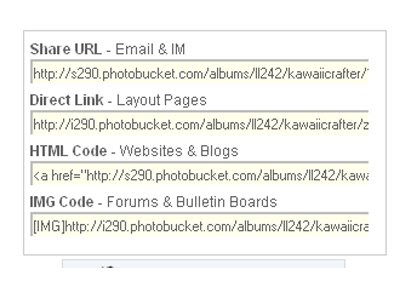 Right Click on the code titled "HTML Code - Websites & Blogs" and click copy. Save the code somewhere you can alter it. I saved it in Word.
You will now have a code that looks like this.

"click on above image to see better"
Now replace the highlighted area with the web address you want your button to link to. Which I'm guessing would be your site's address.
NEW Next replace alt="Photobucket" with atl="Your site's name". Whatever words you replace with Photobucket will show in case the picture is not available for some reason. That's it, you have now created the html code for your button.
*One last thing, to display the code for people to see you'll need to drop it into a code box. This is very easy to do as well. Here's the link that gives you the code for the box. You might need to scroll down a little to see it.
If you have any questions feel free to leave a comment or email me. I'll do my best to answer any questions.
*Disclaimer - I do not write HTML code. I am not an expert. I simply figured this out and wanted to share it with everyone.
The first thing you will need is a photobucket account, click here. It's free and easy to set up.
Why Photobucket? Photobucket provides a code for you that can easily be altered. Plus you will need a place to store your image.
Choose an image you want for a button. I recommend saving it in the jpeg format. Also, you will want your image to be the actual pixel size of how you want to view it. For example the button above is 100px by 100px. This button size works well because it fits on most blog sidebars.
After you upload your picture in photobucket, click on the image. In the bottom, right hand corner of your screen you should see this box.
 Right Click on the code titled "HTML Code - Websites & Blogs" and click copy. Save the code somewhere you can alter it. I saved it in Word.
You will now have a code that looks like this.

"click on above image to see better"
NEW Next replace alt="Photobucket" with atl="Your site's name". Whatever words you replace with Photobucket will show in case the picture is not available for some reason. That's it, you have now created the html code for your button.
*One last thing, to display the code for people to see you'll need to drop it into a code box. This is very easy to do as well. Here's the link that gives you the code for the box. You might need to scroll down a little to see it.
If you have any questions feel free to leave a comment or email me. I'll do my best to answer any questions.


